
Clients wishing to place their banner ads on the Google Display Network, often ask about which banner sizes they should opt for.
The Research
Here are the basic options:
- Banner: 468 x 60;
- Leaderboard: 728 x 90;
- Square: 250 x 250;
- Small square: 200 x 200;
- Large rectangle: 336 x 280;
- Inline rectangle: 300 x 250;
- Skyscraper: 120 x 600;
- Wide skyscraper: 160 x 600;
- Half page: 300 x 600.
In order to answer this question we carried out a brief research. Even though it’s small, it does involve the Mobile leaderboard banner (320 x 50), as it’s only available in non-animated image ads. We conducted a sampling of 20 million impressions and here’s what we got: 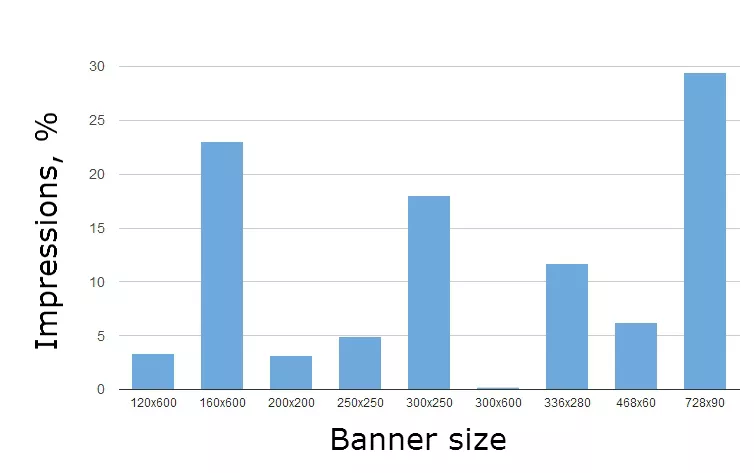
- Leaderboard: 728 x 90;
- Wide skyscraper: 160 x 600;
- Inline rectangle: 300 x 250.
We hope that these statistics will help you to choose the best banner ad size on the Google Display Network.
Afterword
We can’t disclose the project domain whose data was used in our research (NDA). In fact, we recommend trying all the possible options for maximum coverage, but there may be various reasons for clients to fail to do this.

 0
0
 0
0
 0
0
 0
0
Related Articles
Online Local Advertising for Small Businesses: How Neighbors Find You Online
Discover how small businesses use online local advertising to show up in search, maps, and social feeds — and turn neighbors into customers.
How to Do SEO for a Cleaning Company in 2026? From Invisible to Fully Booked
If you do it right, cleaning service SEO becomes your most sustainable growth channel — bringing in clients, lowering acquisition costs, and building long-term online visibility.
13 Leading Healthcare Marketing Trends for 2026
Discover the 13 hottest healthcare marketing trends in 2026 that will help your brand stay ahead, engage patients, and drive results. Stay smart, stay relevant!