
One of the key marketing problems all online stores try to cope with is that about 70-80% of all users usually leave website at the stage of making an order. The majority of mistakes in the ordering forms are extremely trivial, and we have already given some precise advice on how to prevent it. However, every day we see the order website forms that consist of many fields and look really boring. Because of that we decided to show the detailed checklist for every type of order forms for E-commerce sites. You can show this post to all the design and usability rules violators.
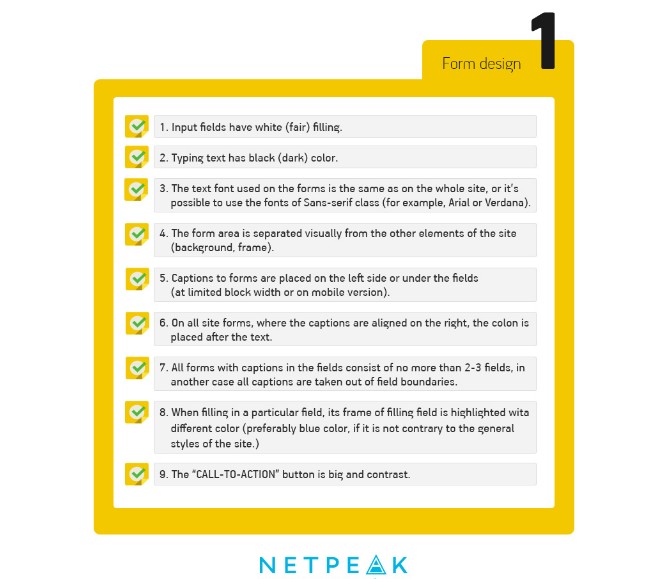
In the “Western world” countries, the issue of the design culture form development was solved with help of contests, such as Web Form Design Awards and Ecommerce Design Awards by Shopify. Not only the best participants can take top places. For example, this project was recognized as one of the ugliest Ecommerce sites in UK. Unfortunately, such voting systems are not presented in our country.
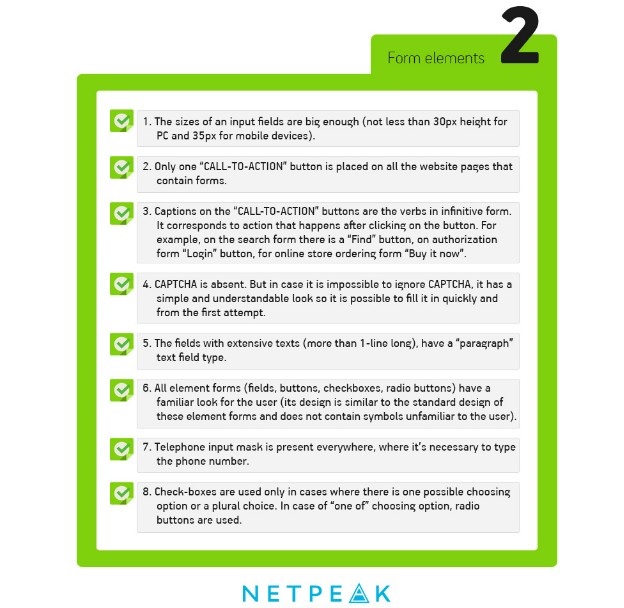
One of the top usability specialists Christian Holst recommends to avoid such buttons as “Next”, “Preview” and especially – “Confirm” (if it refers to the confirmation of sending the forms’ data) when creating a form. More than 50% of participants of Holst experiment haven't even thought about pressing the button in case there is a second CTA on the site page.
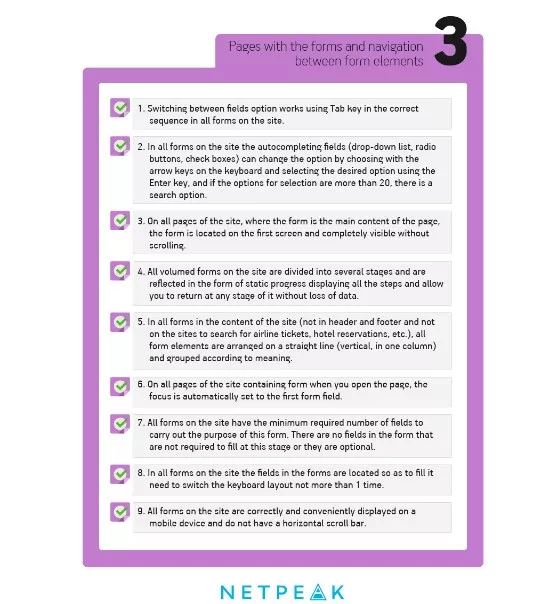
Specialists don’t recommend to add a separate field with the button for promo code input (gift coupon). The great number of users like to “google” promo code and don’t come back no more on the site. So it’s easier just to show the question ( “Do you have gift coupon?”) with active link and pop-up input field.
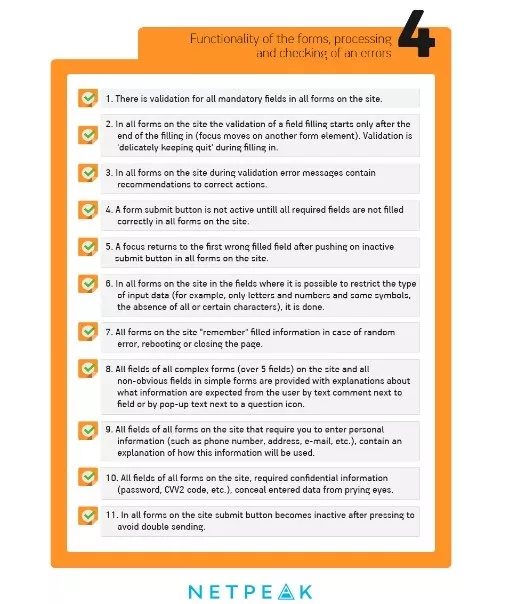
The checklist version without editorial comments is presented on our Pinterest page. Besides thinking about quality design of order forms itis also necessary to think about quality setup of advertising campaign for attraction of potential customers. Do you want to spend money with benefits? Read step-by-step instruction on set-up of contextual advertising.

 2
2
 0
0
 2
2
 0
0
Related Articles
Sustainability Marketing: 7 Smart Ways to Earn Trust (and Customers)
Learn how to grow your brand efficiently while using eco-friendly marketing practices to build trust and long-term revenue.
Why Your Amazon Pet Ads Are Getting More Expensive Every Quarter Since 2025 (and How Smart Brands Manage It)
What happened to the auction prices? Where is the margin going, and what should be done next quarter?
How to Track Brand Mentions in AI Search? Find Out Whether You Are in the Answer
Being mentioned in an AI search boosts visibility. Discover how to monitor your brand mentions in ChatGPT, Perplexity, or Gemini and follow our approach to higher mention frequency.