
How to Track Traffic from Google Discover in GA4 and Google Search Console
In addition to organic traffic from search results, Google offers another way to receive free clicks from your target audience: Google Discover. However, the process of tracking these clicks is not always apparent because there isn’t much official information about it.
In this article, I will explain what Google Discover is and which websites should consider this traffic source. Most importantly, I will discuss how to properly track this traffic in Google Search Console and Google Analytics 4.
- What is Google Discover?
- Service features
- Which sites benefit most from this traffic source?
- How do you track traffic from Google Discover in Google Search Console?
- How do you track traffic from Google Discover in GA4?
What is Google Discover?
Google Discover is a personalized selection of content based on a user's interests, search history, and browser activity.
This content can include analytical and expert articles, news, publications, videos, blog posts, and other types of material.
This service is only available on mobile devices through the Chrome and Google apps. Users can manually customize their feed by specifying their interests and preferences, selecting specific topics or resources, and providing feedback on content they like or dislike.
To access Google Discover:
-
Open the Google app on your smartphone.
-
Scroll down to the Discover section on the home page or in a new tab to see your personalized content feed.

Service features
Google Discover uses a combination of machine learning and user behavior analysis. The system uses its algorithms and Knowledge Graph to process vast amounts of content and select the most relevant and reliable information for the user.
At the same time, it uses thematic identification technology based on Google's knowledge base. The algorithm analyzes topics that have previously interested the user as well as behavioral patterns, such as time spent reading articles, clicks on links, and activity on other Google services.
Read the article to learn about 13 effective methods for consistently driving traffic from Google.
Which sites benefit most from this traffic source?
Google Discover is beneficial for large news sites and niche resources, as they regularly publish large amounts of high-quality content that interests a broad audience. For these sites, Google Discover often becomes a key traffic source, sometimes surpassing organic search in terms of volume.
For instance, a website that receives approximately 300,000 organic visits per month could reach 900,000 through Google Discover. This is due to the high click-through rate (CTR): it averages 2% in search results, but about 10% in Discover thanks to personalized content delivery.
Regardless of the monetization model, the main income of media resources is usually associated with paid promotion. The more traffic sources a website uses, especially powerful ones like Google Discover, the wider its reach. This increases recognition and makes a website more attractive to advertisers, directly affecting the growth of advertising costs and revenues.
Advantages of Google Discover:
-
Mass display of content to a relevant audience.
-
Free flow of high-quality traffic.
-
Ability to cover narrow thematic niches.
-
Brand strengthening and increased recognition.
-
Acts as an additional, stable source of traffic.
How do you track traffic from Google Discover in Google Search Console?
The Google Discover performance report can be found under the Search results report in the Google Search Console sidebar.
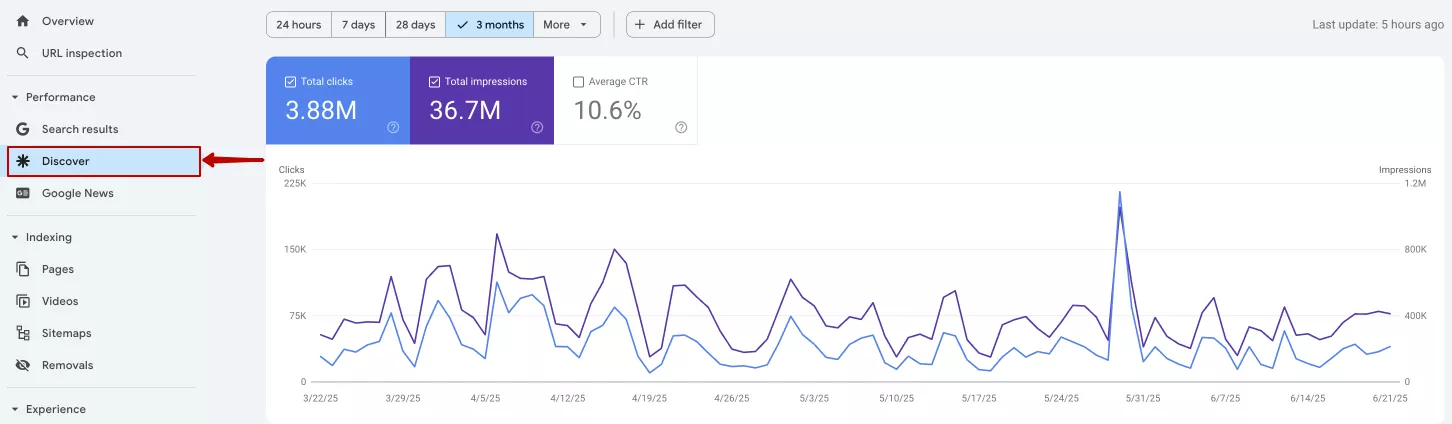
This report displays key metrics for website performance based on Google's recommendations. Data on clicks, impressions, and average CTR is available by default. You can filter the information by date, page, country, or display type. You can also compare two values within any selected parameter.
If this report does not appear in your Google Search Console account, your resource has likely not reached the minimum Discover threshold over the past 16 months. According to Google's official Help Center, this threshold is approximately 1,000 impressions.
How do you track traffic from Google Discover in GA4?
The Google Search Console report only provides basic data and does not allow for in-depth traffic analysis. For instance, you cannot build audiences or see the number of sessions, behavioral metrics, or conversion information. Furthermore, the report may not be available if there aren’t enough impressions.
Therefore, tracking traffic from Google Discover in Google Analytics 4 is also prudent.
The primary source of Google Discover traffic is the Google mobile app, also known as the Google App or Google Feed. Discover is also available through the Chrome browser on Android or iOS, as well as some other browsers on Android.
A non-standard referrer is used for transitions: com.google.android.googlequicksearchbox.
A referrer is part of the HTTP request header that indicates the address of the page the user came from.
In GA4, a significant portion of this traffic is recorded as direct because the system does not receive referrer data. Some transitions are classified as Unassigned or Referral because they are not classic HTTP referrers, and the platform cannot always identify them correctly.
To obtain detailed traffic data from Google Discover by page, it is best to create a custom report in GA4.
-
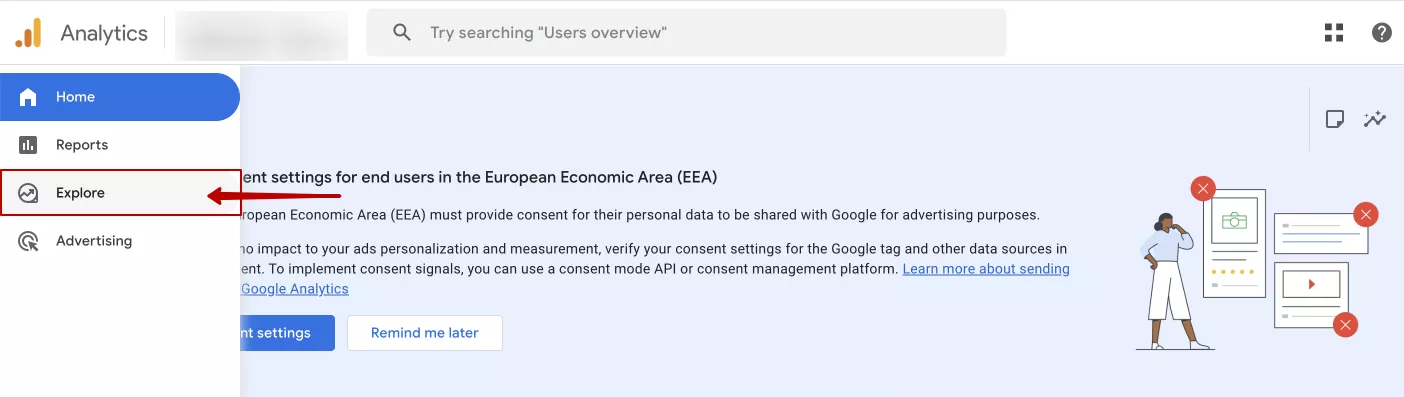
Go to the Explore tab in GA4.
-
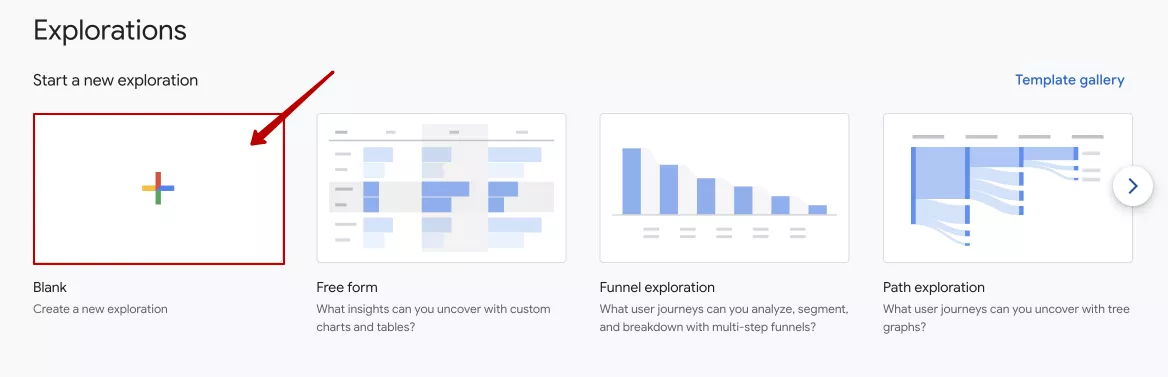
Select Create a new exploration.
-
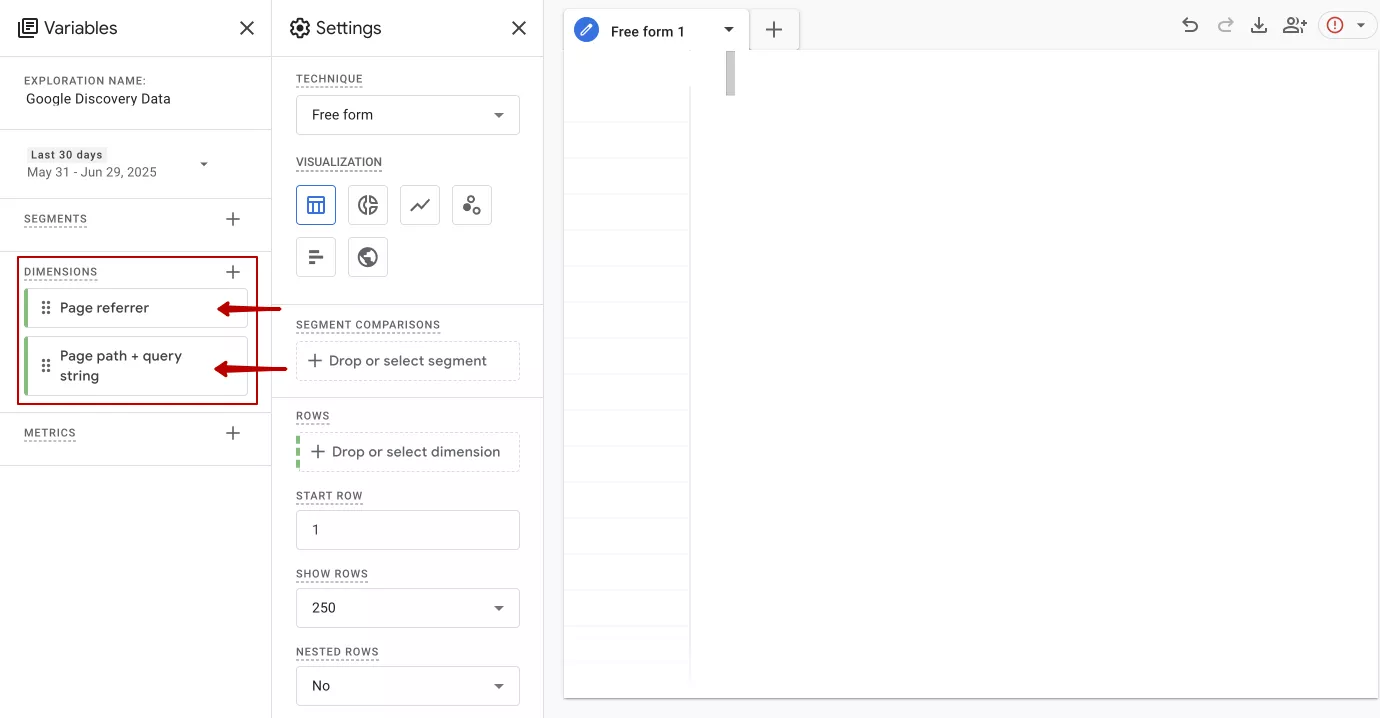
In the DIMENSIONS block on the left side of the Variables tab, select: Page referrer and Page path + query string (the URL of the page transition).
-
In the METRICS block on the left side of the Variables tab, select: Views, Sessions, and Active Users.

-
Drag the Page path + query string parameter from the left to the Rows block on the Settings tab.

-
Drag the metrics Views, Sessions, and Active Users from the left to the Values block on the Settings tab.
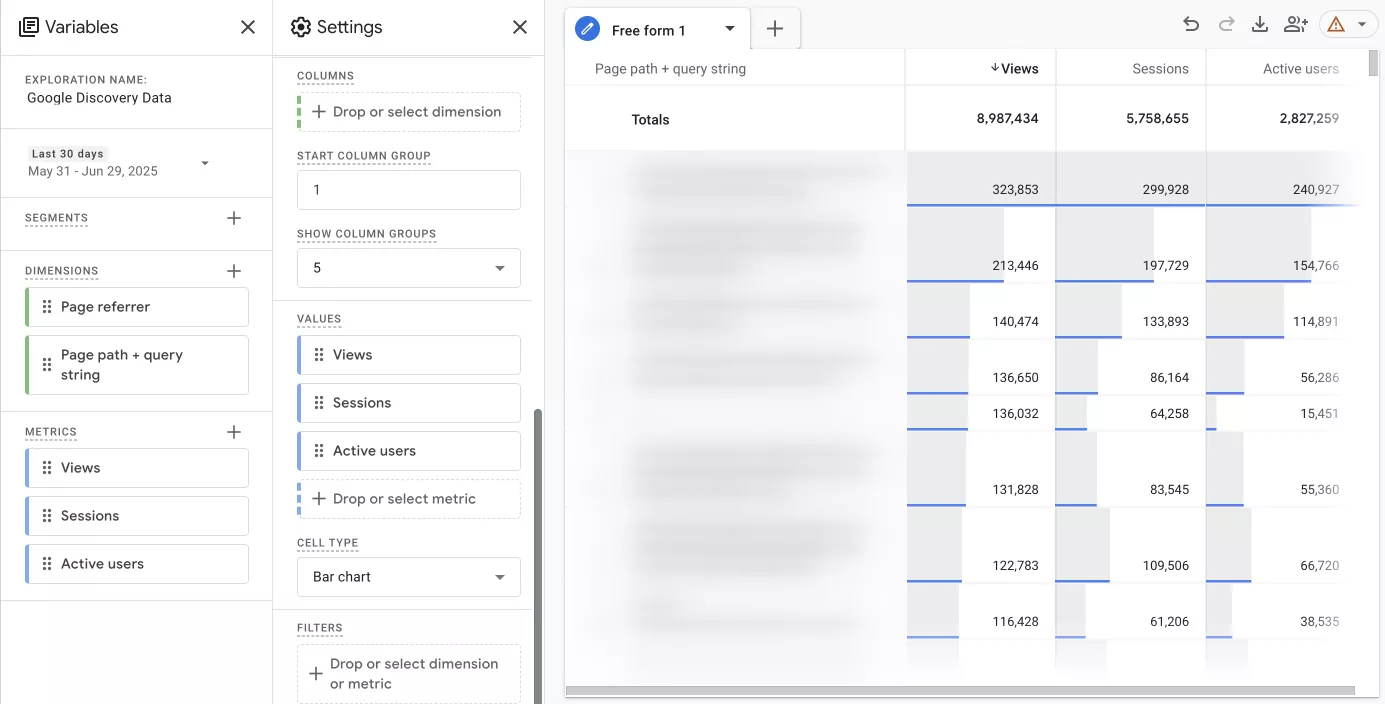
-
In the FILTERS block on the Settings tab, select Page referrer (URL of the page transition) from the drop-down list. Next, specify the exact matches option in the conditions. Then, select the value android-app://com.google.android.googlequicksearchbox/ and click Apply.
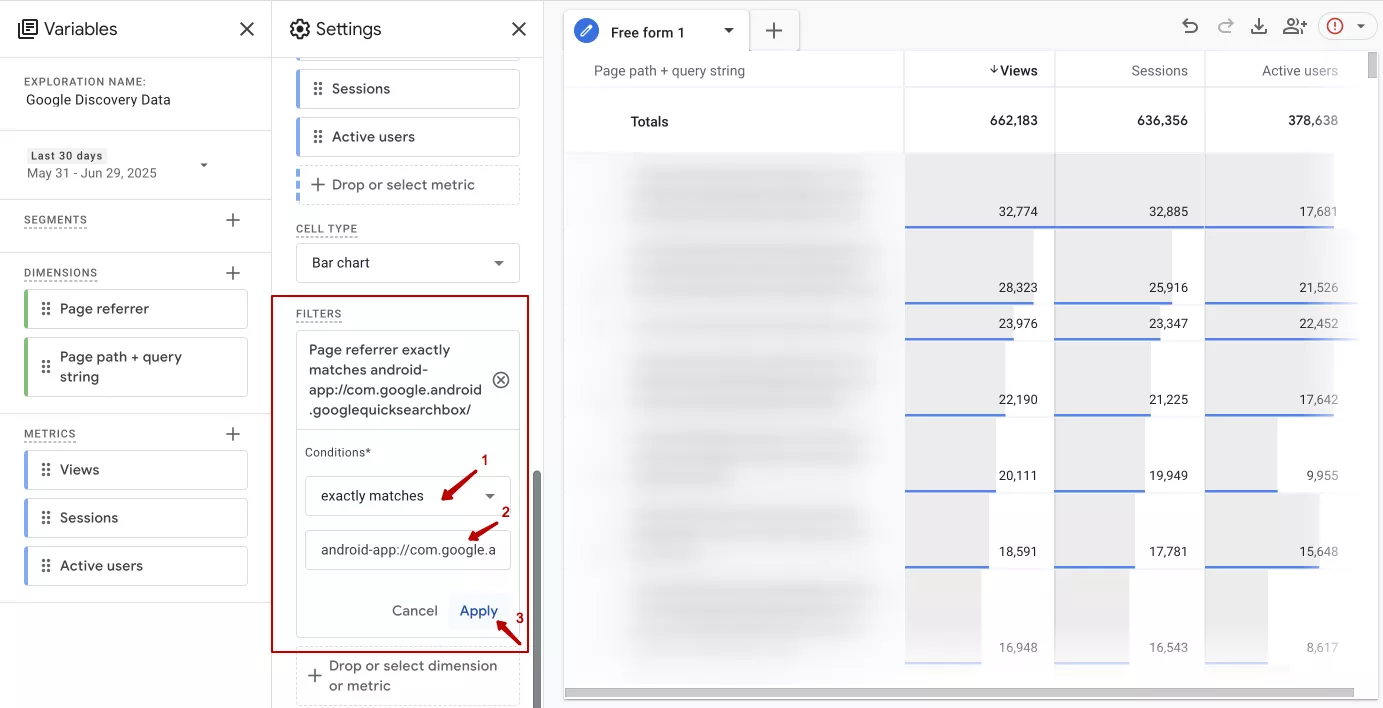
-
After applying the filter, you will notice that the metric values have changed. You can now save the report, and it will be visible to all users with access to your Google Analytics 4 account. You can also export the report in Google Sheets, CSV, or PDF format.
Please note that the metrics used for analysis may differ from those shown in the example. This depends on the niche, type of business, and website structure.
Checklist: How to get on Google Discover
-
Publish content on popular topics.
-
Ensure that your website and content are adapted for mobile devices.
-
Use high-quality images, which are at least 1200 pixels wide.
-
Add video content, including YouTube videos.
-
Optimize meta tags and titles for relevant keywords.
-
Update and refresh your content regularly.
-
Keep the E-E-A-T principles (experience, expertise, authoritativeness, and trustworthiness) in mind when writing content.
-
Develop your brand and work on its recognition.
-
Set up a Google Knowledge Graph profile for your website and specify yourself as the author.
-
Use the Web Stories format.
-
Promote your publications on social media to increase your reach.
Conclusions
-
Google Discover is a personalized content feed available on the Google mobile app and the Chrome browser for both Android and iOS devices.
-
It can be a significant source of free traffic, especially for news and niche websites. In fact, it can sometimes surpass organic search in terms of traffic volume.
-
The Google Search Console has a Discover report that displays basic metrics such as clicks, impressions, and CTR. This report becomes available once you reach 1,000 impressions over the last 16 months.
-
However, GA4 does not recognize Google Discover as a separate traffic channel because it comes through the non-standard referrer com.google.android.googlequicksearchbox.
-
It is still possible to track clicks from this source in GA4. The solution is to create a custom report with a filter for the referrer android-app://com.google.android.googlequicksearchbox/.

 0
0
 0
0
 0
0
 0
0
Related Articles
New Apple Ads Update Changes the Game. Restructure Your Budget ASAP
Apple’s new App Store ad placement is live. Organic traffic is at risk. Learn how to conquer auction uncertainty.
Why Target College Students for Marketing? Moving Companies' Untapped Gold Mine of Leads
College students move more often than almost any other group, yet they’re the least experienced at hiring movers. That’s exactly why moving marketing to them should be specific.
Amazon Review Sharing Across Variations Update: How Your Pet Brand Just Lost Half Its Reviews
For years, bundling ASINs to pool reviews was the open secret of Amazon's pet category. That era is officially over.