
Netpeak Checker: how to determine website quality in the backlink profile and evaluate domain authority
Netpeak Checker is a unique tool designed for the mass analysis and comparison of websites on wide range of different parameters. It is defined by the high operating speed, large volumes of processed data, wide possibilities for the program appliance — from analysis of the competitors’ websites to selecting potential donors for the backlinks’ obtaining. There is also a functionality to operate via proxy servers and combining with different SEO services. Today, we start to publish tips for those who only get acquainted with Netpeak Spider.
Task 1. Quickly determine the quality of the site in the backlinks profile
To determine TF and CF domain list we need to get these parameters using Netpeak Checher. In the Parametrs menu choose “Citation Flow” and “Trust flow”. 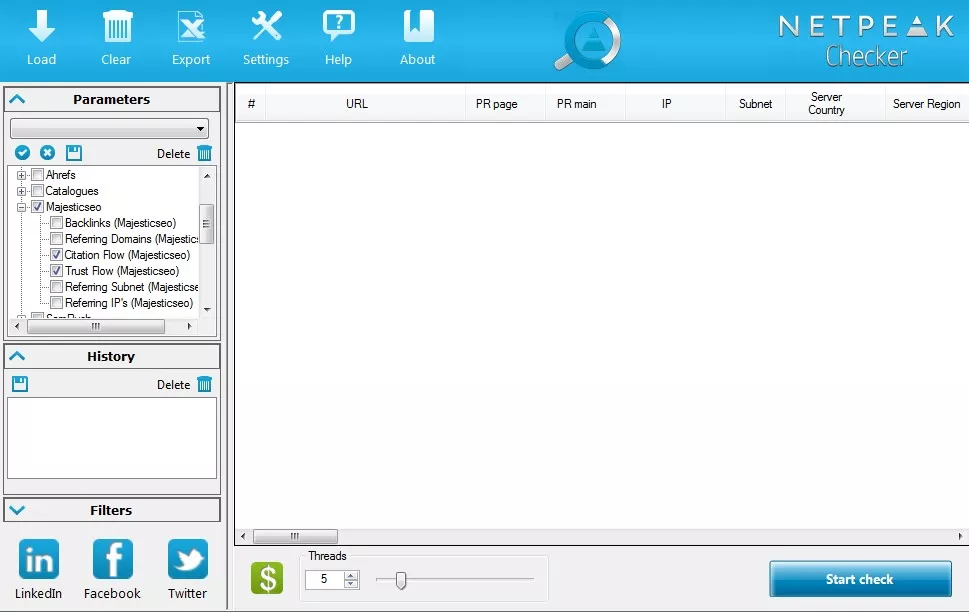
Load the site for verification (“Load” button):
After determining the parameters count the Rank value for each site and use the data obtained for cleaning the reference profile.
Task 2. Evaluate domain authority
- PR main
- Moz Domain Authority
- Trust Flow
- Domain Rank Ahrefs
- Citation Flow
- Rating
For each of the values set in the menu “Settings” – “Rating” ranges and their corresponding ranking, for example: 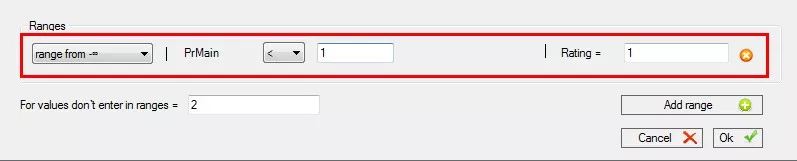

Here you can find our advices for Netpeak Spider users. We'll publish more Netpeak Checker tips soon so stay tuned!

 0
0
 0
0
 0
0
 0
0
Related Articles
Online Local Advertising for Small Businesses: How Neighbors Find You Online
Discover how small businesses use online local advertising to show up in search, maps, and social feeds — and turn neighbors into customers.
How to Do SEO for a Cleaning Company in 2026? From Invisible to Fully Booked
If you do it right, cleaning service SEO becomes your most sustainable growth channel — bringing in clients, lowering acquisition costs, and building long-term online visibility.
13 Leading Healthcare Marketing Trends for 2026
Discover the 13 hottest healthcare marketing trends in 2026 that will help your brand stay ahead, engage patients, and drive results. Stay smart, stay relevant!