
We continue to publish tips for Netpeak Spider users. Earlier we wrote how to calculate PageRank for internal linking and check the amount of text around images with Netpeak Spider. Today, we will tell how to use Netpeak Spider to develop competitive intelligence.
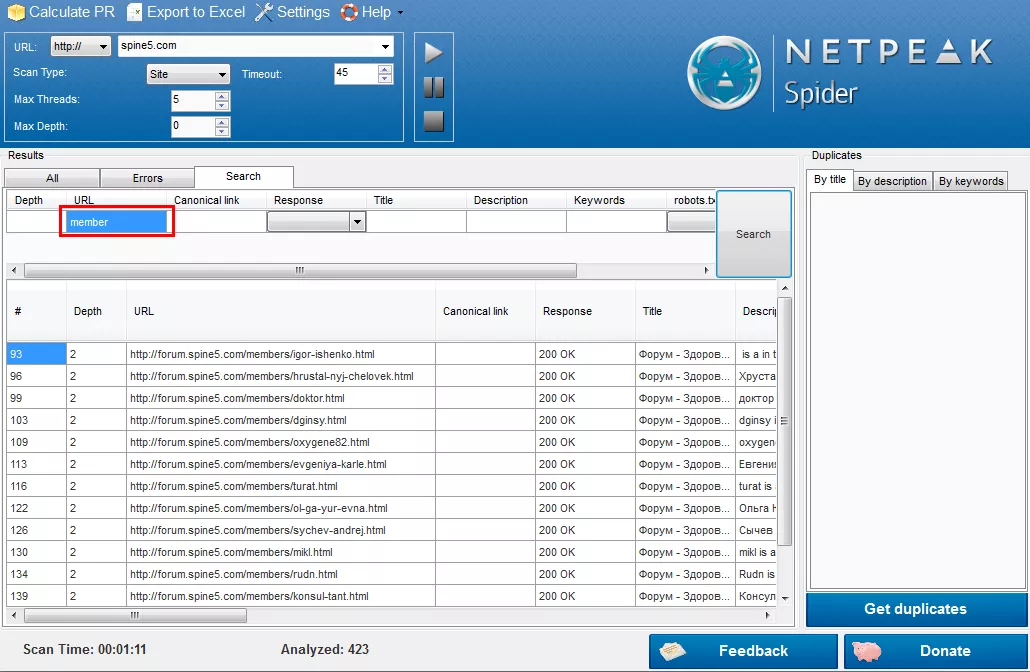
Task 5. Get the forum members list for the forum, that is located on a separate subdomain.
Solution: In the menu “Settings” – “Scan” we need to activate the checkbox “Scan subdomains”: 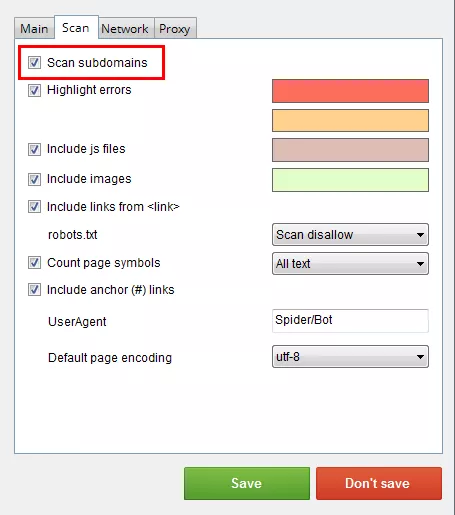
Task 6. Determine the state of affairs for the product category in comparison with competitors.
Scan your website with “Google” scan type. In Excel compare the URL with the data for both types of scanning. Now you have a list of URL's for products in the category, that are present in the Google Index. Repeat the same process for the same product category on the competitors sites. Compare the data for your site with the information for competitors' sites and make changes to the promotion strategy for this product group.

 1
1
 1
1
 0
0
 0
0
Related Articles
Business Apps in the US: iOS vs. Android, September 2026
We searched for US App Store and Google Play data to see what business apps professionals, shoppers, and investors actually installed in September.
Pet Food Product Patent: How to Protect Your Innovation
Patenting pet products requires careful consideration and proper application filing. With the 8 steps below, you will be able to submit your patent application and protect your invention.
What Happens When Amazon Suppresses Your Listing? The New 2026 Rules
Under the new 2026 rules, Amazon warns you first and gives you a grace period to fix the issue.