
Shoppable YouTube: How to Make Every Screen Shoppable
Shoppable YouTube turns your video ads into mini storefronts by adding clickable products from your Merchant Center catalog. This guide covers the three ways people can shop from an ad (product cards, shoppable image ads, and QR codes on smart TVs), real results from Reebok, Central Retail and Migros, omnichannel options, and a step-by-step setup.
There’s an old joke about a lion who asks all the animals to split into two groups: the smart ones on the left and the beautiful ones on the right. Everyone moves except the monkey, who stays in the middle.
“Well?” asks the lion. “Pick a side.”
“What am I supposed to do?” says the monkey. “Split myself in two?”
YouTube has the same problem. It’s where we go for funny cat videos, but it’s also a powerful marketing platform where people discover brands, learn about products, and decide what to buy. So which side does it belong on: engaging or useful? Both.
YouTube has over 2.5 billion global users (Statista). And paying users are a small minority: YouTube Music and Premium had over 125 million subscribers, including free trials, and that's about 5% of viewers. Everyone else is watching ads on YouTube — it's a huge audience!
That’s why your brand should learn all about Shoppable YouTube and how it turns your video ads into mini storefronts. This guide explains the two main ways to run it and covers a step-by-step setup.
What "Shoppable YouTube" Actually Means
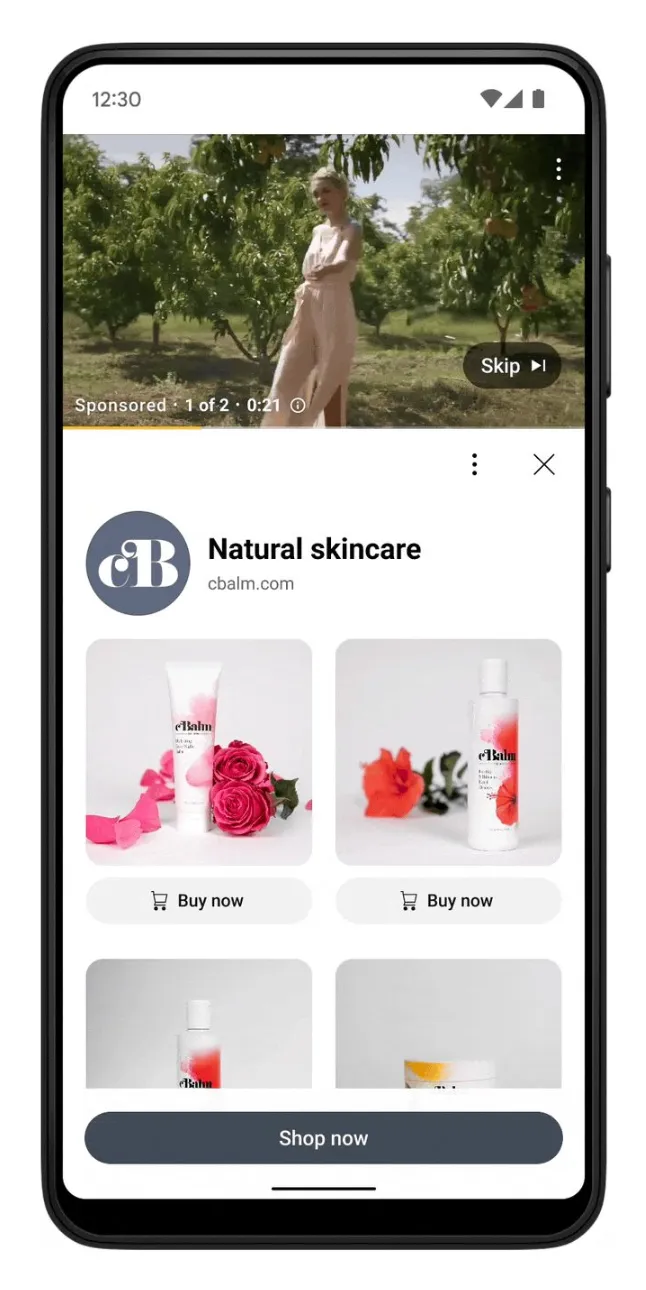
Shoppable YouTube is about adding clickable product info from your catalog to your video ads. In practice, it usually looks like this:

Source: Google
-
Product cards next to or under the shoppable video, showing the image, name and price.
-
A clear call to action, such as "Shop now."
-
A live product feed, so prices and stock stay current.
-
Checkout links that direct viewers to a checkout page when they are ready to buy. They bring +15% conversion uplift with Performance Max (Google).
Source: Google CSS Academy
Want a refresher on the basics first? See our guide to the 4 different types of YouTube ads.
Why Shoppable YouTube Matters Now: Stats
Here are the shoppable YouTube stats worth knowing, with what each one means in practice:
-
In the last 12 months, people watched more than 35 billion hours of shopping content on YouTube (Think with Google).
-
66% of viewers say YouTube creators help them make more confident purchase decisions. Shoppers look to creators for advice and deep dives (YouTube for Business).
-
72% of incremental conversions on YouTube come from brand-new customers (Google).
-
Product feeds lift results. Advertisers who added product feeds to video action campaigns got over 60% more conversions at a lower cost (Google).
For a small and medium-sized business, that means you can turn videos you already have into a storefront without building a new sales channel from scratch. It's also worth reading about what Amazon joining YouTube Shopping means for competition in the space.
Three Ways People Can Shop From a YouTube Ad
Imagine a homeware brand advertising a new table lamp. It has a short video showing the lamp in a cozy living room, plus an online catalog with the lamp’s photo, price, and product page.
Google Merchant Center holds that catalog information. The brand can connect it to Google Ads so viewers can explore the lamp while watching the ad. What that looks like depends on the screen and ad type.
1. Product Cards Beside or Below a Video
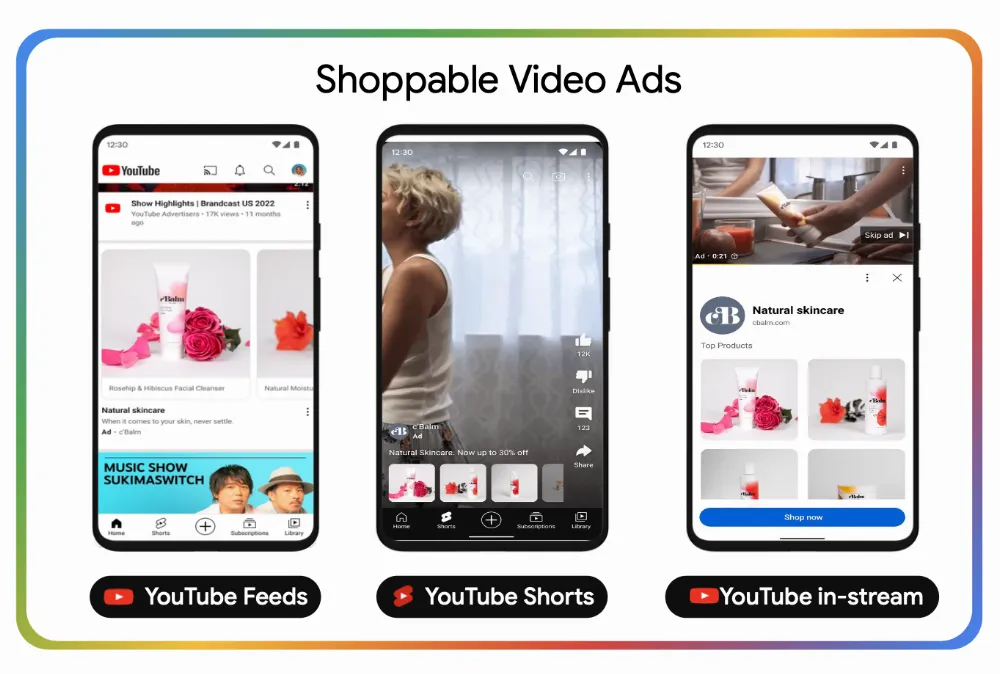
On YouTube, a video ad can appear with product cards beside or below it. Each card shows a product’s image and price. Viewers can tap a card to open that product’s page on the brand’s website.
The video shows the product in action, while the cards make it easy to shop.
Source: Google CSS Academy
To set this up, a brand connects its Merchant Center product catalog to an eligible Google Ads campaign, such as Demand Gen. Google then uses the catalog’s images and product details to create the cards.
Example: During the pandemic, people started to search on YouTube how to “work out at home”. Reebok responded with a video campaign for its High-Intensity Interval Training (HIIT) shoes. And they added product feeds, so interested viewers could move from the ad to the shoes.
The YouTube shoppable ads with product feeds drove 54% more conversions at a 26% lower cost than ads without them. They also brought 74% more new users to Reebok’s website (Campaign Middle East).
What to copy: Start with what people are trying to do, then show a product that helps. A pet brand, for example, could show how a puzzle feeder keeps a dog busy indoors and place that exact feeder beside the video. The product card should feel like a helpful answer to the viewer’s next question.
2. Shoppable Image Ads
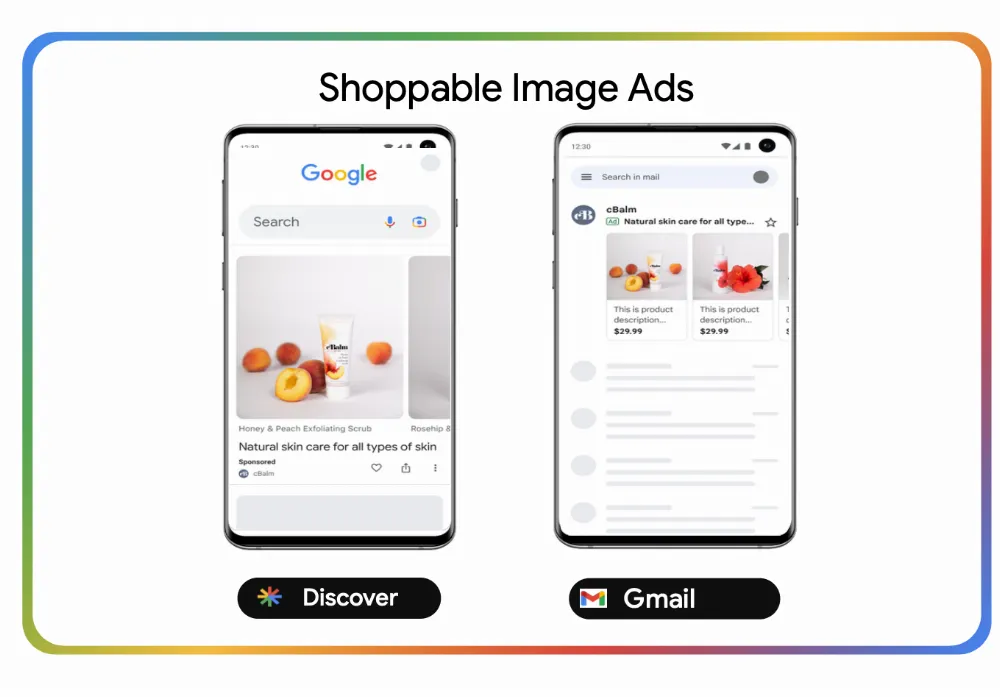
In Demand Gen, shoppable image ads run on two surfaces:
-
Discover. It’s Google's personalized content feed, where people browse for inspiration rather than search for something specific. Shoppable image ads here show products from your feed in a visual format, so a shopper can go straight to the product page.
-
Gmail. Gmail ads appear in the inbox, where people check in several times a day. A shoppable format shows several products from your feed side by side, with images, prices, and short descriptions.
Source: Google CSS Academy
What to copy: Mature Demand Gen campaigns with large product selections typically see a 33% increase in conversions when adopting product feeds (Google data).
3. Product Information and QR Codes on a TV
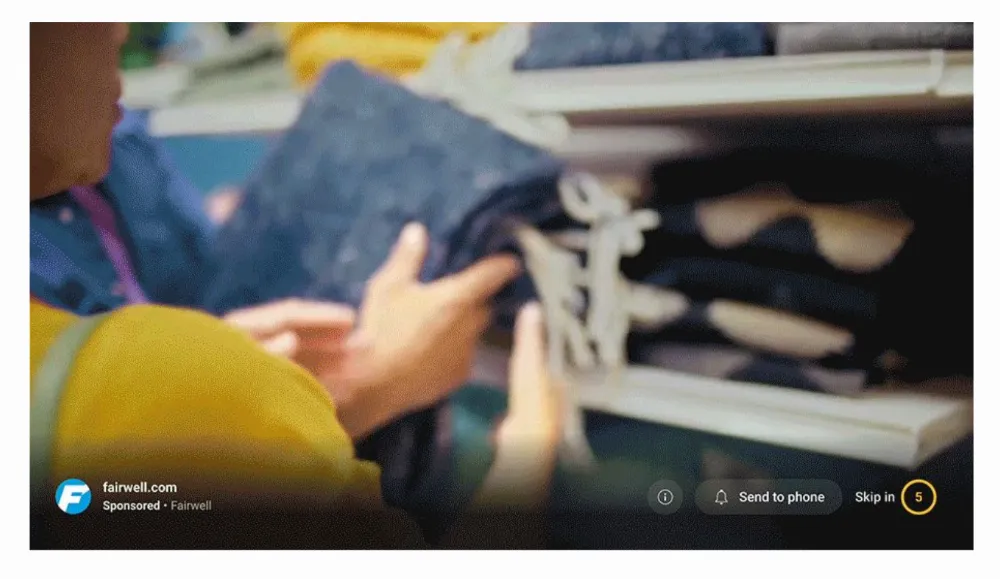
A shoppable YouTube ad on a smart TV is different: viewers usually can’t tap the screen. Instead, an eligible YouTube ad can show a QR code and a product panel. A viewer who likes the product can scan the code with their phone and continue shopping there.
Source: Google CSS Academy
With eligible Demand Gen and Performance Max campaigns, viewers can see products and scan a QR code to shop while watching YouTube on their TV. It won’t show every time: the TV must support the format, and the product images need to be high enough quality (Google Ads Help).
What to copy: Show the product, then give interested viewers an easy next step. Keep that catalog accurate so the ad doesn’t show an old price or an unavailable item.
|
Video with product cards |
Shoppable image ads |
Shoppable ad on a smart TV |
|
|
What viewers see |
A video with products beside or below it |
Products from your feed in a visual format in the Discover feed or the Gmail inbox |
A video with a product panel and QR code, when eligible |
|
How they shop |
Tap a product card |
Tap a product image |
Scan with a phone |
|
Where they finish buying |
The brand’s website |
The brand's product page |
Usually the brand’s website on their phone |
Real-Life Success Stories
What happens when these tools meet real campaigns? Here’s how brands used them to turn attention into store visits and sales.
Central Retail Case Study
Central Retail is one of Thailand's leading department stores with more than 2,050 stores in Thailand, 120 in Vietnam and nine in Italy.
Their team ran a four-week shoppable YouTube performance A/B test using Google's video experiments tool:
-
Control group: a standard video action campaign
-
Test group: the same campaign with a product feed added, and the other ran the same campaign with a product feed.
Creative, audiences, bidding and budgets were identical.
As a result, adding product images and details to the video ads led to 52X conversion volume, -52X cost per conversion, and +32% conversion rate (Google).
Migros Case Study
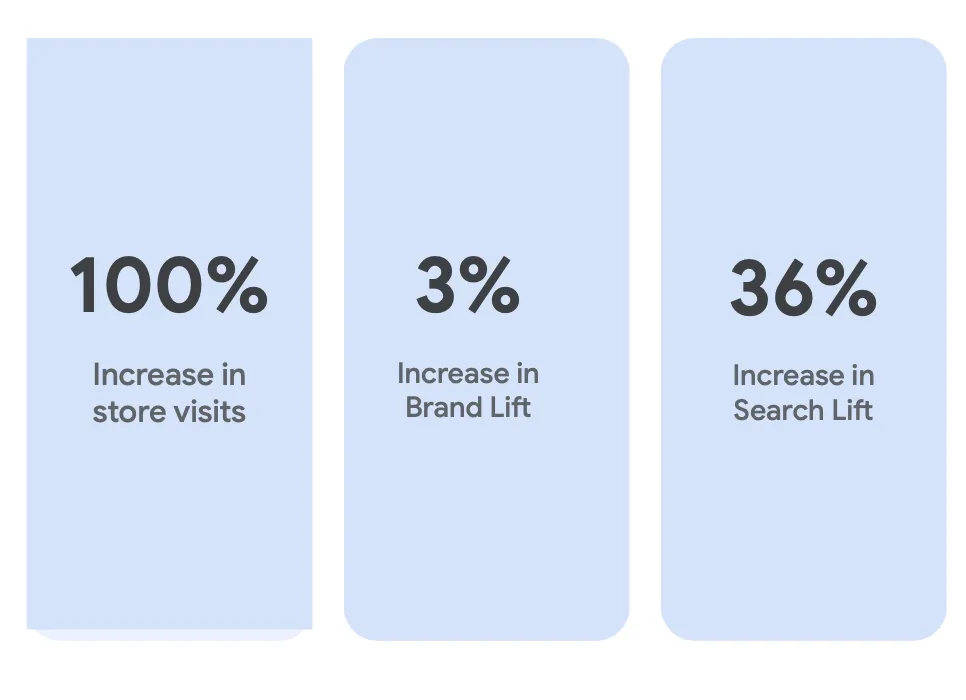
Migros, Switzerland's largest supermarket chain, drove a 100% increase in store visits, a 3% increase in Brand Lift, and a 36% increase in Search Lift by using Demand Gen with Maps and Performance Max.
Source: Google CSS Academy
“Integrating Demand Gen and Performance Max allowed us to effectively turn digital engagement into physical foot traffic, contributing to a 37% increase in total turnover. This store-centric strategy proved that Google’s location-based solutions are vital for driving our commercial performance during critical peak periods”.
Gözde Karasu Öztamur
Media Group Manager, Migros
Shoppable YouTube for Omnichannel Clients
Omnichannel brands sell in stores, online and through apps. Shoppable YouTube fits that model well, because one video and one product feed can support every step of the journey.
-
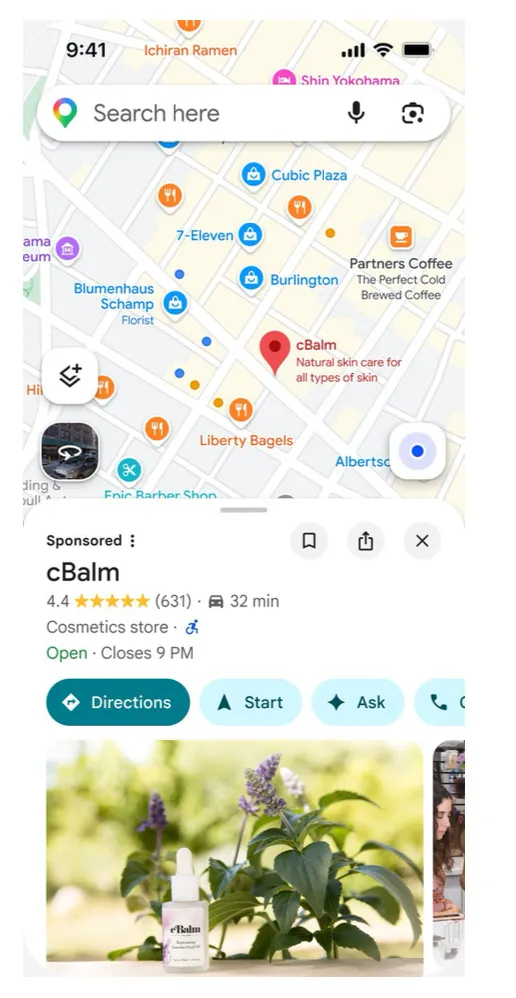
Show up on Maps inventory. Google Maps inventory is available in Demand Gen campaigns and helps to engage more customers at the right moment.
Source: Google CSS Academy
-
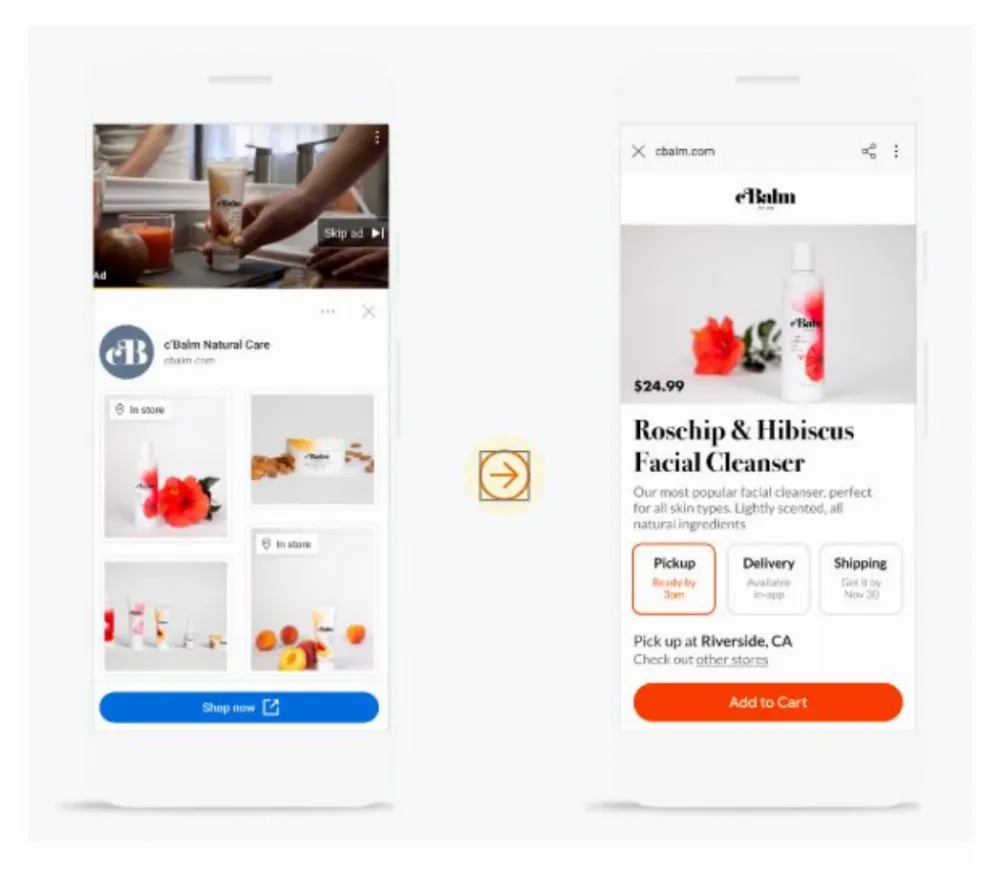
Integrate local and online offers on Demand Gen. This gives more purchase path options and raises awareness of local stores.
Source: Google CSS Academy
-
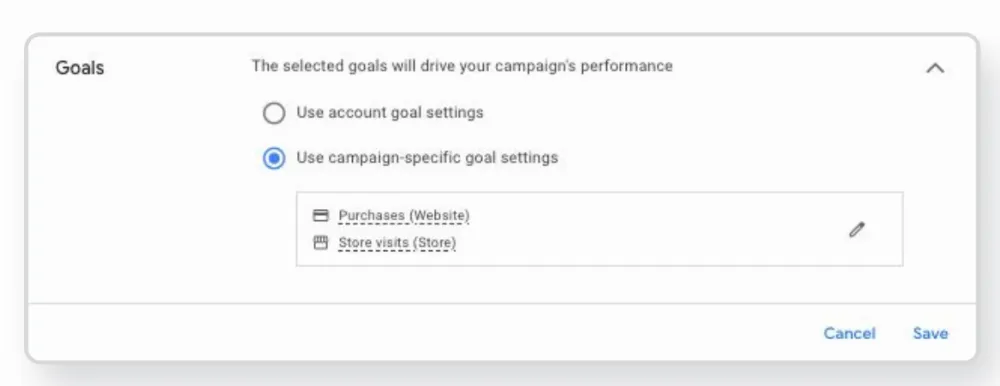
Use omnichannel bidding. Optimize ad spend for your online and offline conversions. It uses Google AI to find users likely to drive results for either goal.
Source: Google CSS Academy
If you run a retail or ecommerce brand, our retail PPC agency and ecommerce PPC agency teams build these setups. For the video side, see our shoppable YouTube ads services.
How to Set Shoppable YouTube Up (Step by Step)
-
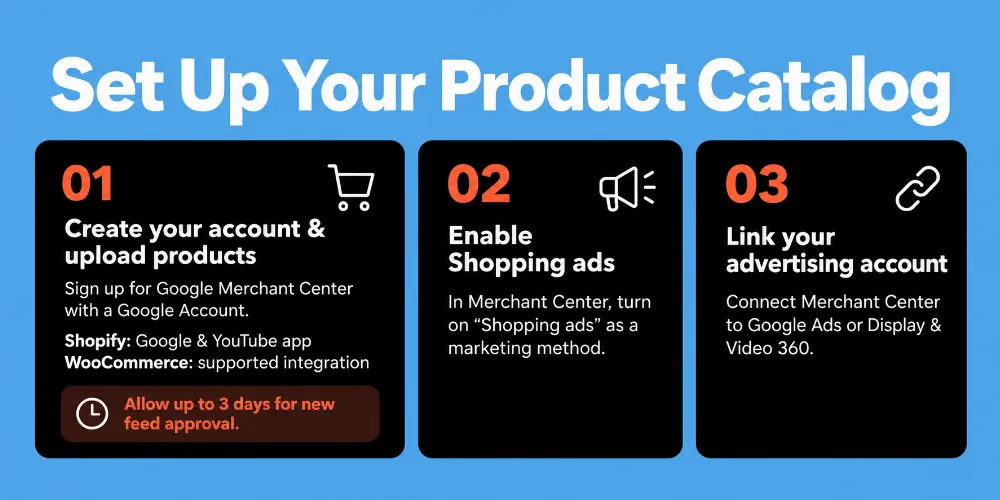
Create a Merchant Center account and upload your product feed. Sign up with a Google Account. Shopify stores can sync products with the Google & YouTube app, and WooCommerce is also supported. New feeds can take up to 3 days to approve, so plan ahead.
-
Enable "Shopping ads" as a marketing method in the Merchant Center.
-
Link Merchant Center to Google Ads or to Display & Video 360.
-
Check your feed quality. Include at least four products, and ideally more. Use square product images, and make them at least 500 x 500 pixels if you want your ads on TV.
-
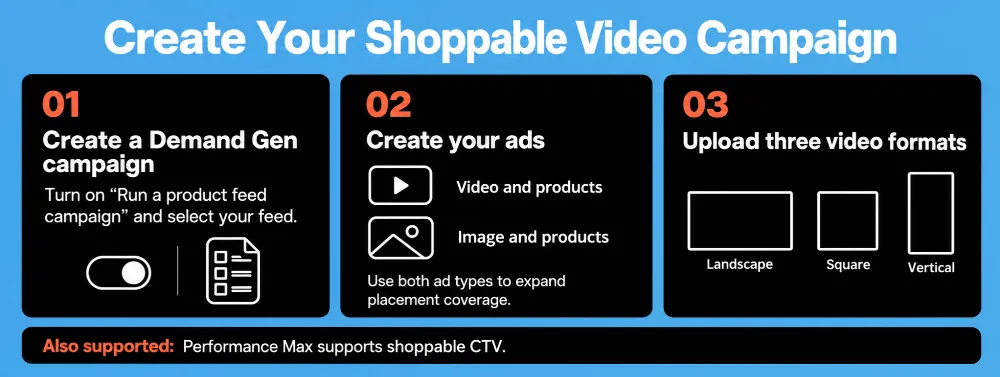
Create a Demand Gen campaign. Turn on "Run a product feed campaign" and pick your feed. Create a "Video and products" ad and, for full coverage, an "Image and products" ad too. Upload video in landscape, square and vertical formats. Performance Max also supports shoppable CTV.
-
Keep TV screens in device targeting so shoppable CTV ads and QR codes can run. Don't opt out of CTV.
-
Add a clear call to action. If you don't, Google Ads and DV360 use "Shop now" automatically.
-
Launch, then review and adjust. Google suggests 1–2 weeks without bid or budget changes so the campaign can ramp up. For target-based bidding, it recommends a daily budget of about 10 times your expected cost per action.
Need help with the feed side? Our Google Shopping team can audit it.
Two Options for Easy Enablement
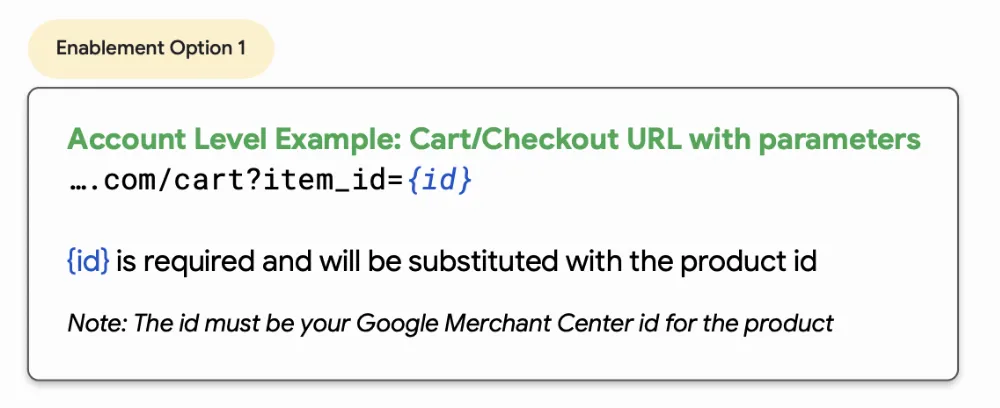
Option 1: Enable at the account level
Use this option if you’d like to enable all products in your feed for Checkout on Merchant, requiring only your cart/checkout page URL and {id} field in your feed.
Source: Google CSS Academy
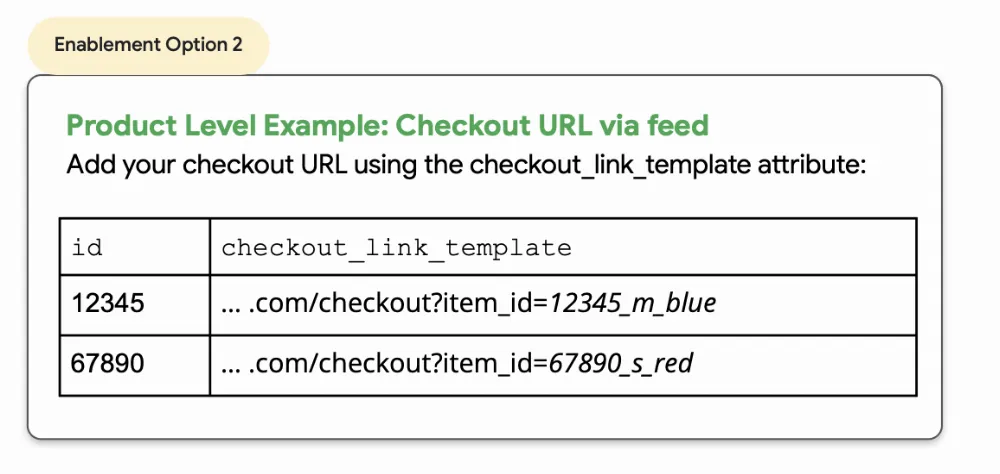
Option 2: Enable at the product level
Use this option if you’d like to enable select products from your feed for Checkout on Merchant, requiring individual custom URLs for each product utilizing the {checkout_link_template} attribute.
Source: Google CSS Academy
Best Practices & Mistakes to Avoid
Do:
-
Make videos built for YouTube, not recycled from other platforms.
-
Keep the feed fresh: accurate prices, availability and titles.
-
Use 16:9 video for TV placements.
-
CTV needs time to prove itself, so be patient.
Avoid:
-
Sending shoppers to pages that don't match the ad.
-
Weak product images or out-of-stock items in the feed.
-
Judging CTV only by last-click sales.
-
Skipping brand awareness. Product ads work better when people already know you.
Unfortunately, the Shoppable YouTube feature isn’t available in all markets yet. Contact us at Netpeak — we’ll check availability in your market and help you explore your options.
FAQ
What is shoppable YouTube?
How do I make my YouTube ads shoppable?
What is the difference between YouTube shopping ads and shoppable CTV ads?
Do I need a Google Merchant Center product feed for shoppable YouTube ads?
Can shoppable YouTube ads help direct response and brand awareness?

 0
 0
 0
 0
Related Articles
What Is the Average Amazon PPC Cost in 2026 by Category?
Explore average Amazon PPC costs in 2026 by category, including CPC and ACoS, to help sellers plan and optimize ad spend.
Which Amazon Categories Are Growing Fastest in 2026?
Discover which Amazon categories are growing fastest in 2026, what is driving demand, and how sellers can identify promising categories and product opportunities.
What Are the Best Amazon Products to Launch in Q4 2026?
During the busy Q4 season, you should consider launching on Amazon Christmas lights, coffee makers, dog beds, Bluetooth speakers, and board games.